Today I'm starting a new project called "Happily Ever After". It'll be a game designed for Android. The game play will mix a few different genres, but focuses on the classic RPG elements.
The last week I've been playing with a few different story line ideas and have come up with a foundation for the design. I've pitched it to a few friends and so far they all think it's a good idea. I don't think this project will be able to wow anyone with its programming or art, but the combination of simple features and solid story might make this stand out.
The only description I have is that "This is not your typical RPG".
Showing posts with label Android Programming. Show all posts
Showing posts with label Android Programming. Show all posts
Monday, June 13, 2011

Saturday, May 28, 2011
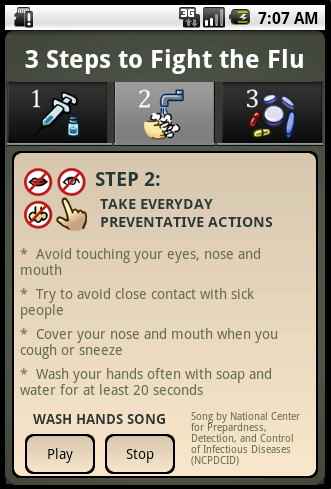
Flu Aware App published!
After much programming, I released my first app!
Please vote for my app here for the CDC Flu Challenge:
http://fluapp.challenge.gov/
It's available for free on the Android Market:
https://market.android.com/details?id=com.wliu.cdcfluaware&feature=search_result
Here's a few screen shots:


Please vote for my app here for the CDC Flu Challenge:
http://fluapp.challenge.gov/
It's available for free on the Android Market:
https://market.android.com/details?id=com.wliu.cdcfluaware&feature=search_result
Here's a few screen shots:



Saturday, May 21, 2011


Sunday, March 13, 2011
New Hardware
Last weekend I splurged and upgraded my Macbook Pro from the 2009 version to the latest 2011 version. Although there's no real differences aesthetically, the internal switch from the old Core 2 Duo processors to the new Sandy Bridge i5 processor has made a huge difference in compile/run times.
The only other bottleneck was the 5400 RPM hard drive, which I promptly switched to a 256 GB Sata III solid state drive. Even though OSX doesn't have TRIM support yet, I'm hoping the hard drive performance won't degrade too much before Lion is released in June (which should have built in third party TRIM support).
In terms of what I'm using the hardware for, I've been documenting what I've learned about Android programming over at code.google.com/p/wliu/ under the 'Wiki' section. I'm still not sure how to use collaborative software like github, but it doesn't really matter yet since I'm still a one man team.
Right now I'm working on the framework for a flashcard program; I figure I can study for my Medical Terminology class and learn how to program at the same time. There's a lot of possible neat twists on how people learn, but for now my goal is a simple working application. Basics first I guess.
Friday, November 5, 2010

Saturday, October 30, 2010
Last Android Class Notes
Additional Information Available on:
Cal Poly Web Site with Android material: https://sites.google.com/site/androidappcourse/home
code.google.com/android
anddev.org
Look through Lunar Lander example for sprite manipulation and physics engine
Should know more java (basic concepts like):
Inner class, polymorphism
Note to self: look up Josh Block book - Intermediate & Advanced Java concepts
Adding Audio:
Add song.mp3 to res/raw/song.mp3 folder
Warning: filenames must be all lowercase! To solve, refactor all filenames.
For Video Viewing:
Use android.widget.VideoView
Play videos in mp4, etc.
Bringing up a web browser (Sample Code)
case 0:
Uri uri = Uri.prase("http://developer.android.com");
Intent inetnt = new Intent(Intent.ACTION_VIEW, uri);
startActivity(intent);
break;
Use Content Providers for Text Messages
Content Providers for Cameras and Camcorders
Always access via 'content://'
Needs a unique string identifying the content provider
Optional to have more than one data type
Optional to have instances of a given data type
Steps to create a Content Provider
1.) Create Provider Class (Includie a static final that defines your content uri)
2.) Create Properties
3.) Update Manifest
Underlying system is Linux based - use same formatting for locations (i.e. use all undercase)
To get external storage - from android.os
Environment.getExternalStorageDirectory()
Environment.getExternalStoragePublicDirector()
I also might be collaborating with some of my fellow classmates on projects outside of class!
Saturday, October 16, 2010
Class 4 -Layouts

Concept: Tips on Layouts within Layouts
Tip: Make one change at a time, then check if it make sense? Does it do what I think it'll do?
Use background colors to check if layouts are acting appropriately with its properties; fill_parent, wrap_content.
The image on the left is two LinearLayouts (each with two buttons) within one LinearLayout (with vertical orientation). Notice Outline setup.
The image on the left is two LinearLayouts (each with two buttons) within one LinearLayout (with vertical orientation). Notice Outline setup.
My thoughts on Android vs. iPhone vs Windows platforms:
There's currently three 'new' platforms for smart phone development; the iPhone, Windows, and Android.
- The iPhone market is popular, but already saturated. As an indie developer, I wouldn't have the manpower to compete against thousands of experienced full time programmers.
- Windows has a history of failure. There was a rumor that went around class that during the unveiling of the new Windows smart phones, the presenter attempted dialing a number only to have the 'blue screen of death' appear.
- Google looks promising and has been gaining market share very rapidly, yet the Android Market is not (currently) saturated. It's also Google; you know a company's made it big when the name is being used as a common verb. I'm going to put my money on Android.
Monday, October 11, 2010
Class 3 -Moarrr Android!
Learned to create/navigate across multiple Activities, the Activity lifecycle, how to modify the XML using the GUI, and how to interact with the user.
Multiple Activities - The different 'pages' of the program. Each time a new page appears, its a new activity.
Modifying the XML using the GUI - Simple drag and drop interface.
Activity lifecycle - Need to read the state of the program. For example, if the program is still running while onPause(), the phone's battery will needlessly drain very quickly.
Interesting tidbit, the whole program re-renders itself every time the landscape is changed. We figured this out by setting up a count on our emulator, rotating the screen, and the count returned back to 0.
I like the humor of some of the Android creators. There's a public static int wtf(string, string) function, which stands for "What a Terrible Failure" and is used to report for an exception that should never occur.
Monday, October 4, 2010
Class 2 - Terminal Commands and my first App!
Learned some useful terminal commands, got into the basic GUI layout, created my first app, and uploaded it onto my phone. I'm picking up on concepts much quicker than I thought I would thanks to a very talented professor.
Terminal Commands:
- android - Opens Android Standard Development Kit (SDK) and Android Virtual Device (AVD) Manager
- emulator - Run emulator for devices
- adb - Android Debug Bridge allows debugging, view logs, and shell commands
Flashlight App:
(I improved on the code by calling the screenBrightness function to increase the phone's brightness to max in case it's not. I've been browsing around the reference materials on developer.android.com and through stackoverflow.com; there is so much information/code. I'm just starting to realize the vastness and potential of open source)
package com.demo.android.flashlight;
import android.app.Activity;
import android.graphics.Color;
import android.os.Bundle;
import android.view.View;
import android.view.Window;
import android.view.WindowManager;
public class FlashLightActivity extends Activity {
//Tag testing: private static final String TAG = "Flashlight";
/** Called when the activity is first created. */
@Override
public void onCreate(Bundle savedInstanceState) {
super.onCreate(savedInstanceState);
View view = new View(this);
view.setBackgroundColor(Color.WHITE);
// Get rid of title bar
this.requestWindowFeature(Window.FEATURE_NO_TITLE);
this.getWindow().setFlags(WindowManager.LayoutParams.FLAG_FULLSCREEN, WindowManager.LayoutParams.FLAG_FULLSCREEN);
//New - Added to increase phone's brightness levels to max brightness
WindowManager.LayoutParams lp = getWindow().getAttributes();
lp.screenBrightness = 1;
getWindow().setAttributes(lp);
setContentView(view);
}
}
Tuesday, September 28, 2010
Class 1 - Intro to Android
I finally found the classroom. Taped across the door was a plain white paper sheet with the word "Android" typed in small black font.
The class started at 9:00 am. I glanced at my phone's clock and reminiscent of my college days, I arrived 40 minutes late. Punctuality was never one of my strengths. As I entered the room, I was relieved to see that the class was still in the middle of introductions.
The course itself is a quick introduction to the mobile platform Android, an open source project popularly used in many of today's "smart phones". It attracted the crowd that you would typically expect when you hear terms like 'modified Linux kernels' or 'debugging'. With the exception of a 13 year old programming prodigy, the class was predominately middle aged software engineers working with big technology companies.
One of my concerns with the class is whether I can keep up; I haven't really programmed in years and the course recommended that I know Java. Also as pitiful as it sounds, I'm really hoping to make some new friends! (I feel like I'm in high school again hoping people will like me) I dread working alone, but I'm also really picky about the people that I spend my time with. I'd love to find someone that's on the same wavelength, that I can code with and bounce ideas off of.
Today we setup our programming environments. It's a tedious setup process. We did the following:
- Download and install the latest Sun Java Release
- Download and install the Eclipse Integrated Development Environment with the Android Development Tools plugin
- Download and install Android Software Development Kit (SDK)
Subscribe to:
Posts (Atom)